Generate content and test it against a real audience in the same breath, straight from your agent: that is exactly what neuroflash’s new developer products unlock. The neuroflash MCP Server is a remotely hosted HTTP server built on the Model Context Protocol, letting any MCP-capable client such as Claude Desktop or Cursor talk directly to neuroflash’s Digital Twins, Brand Voices and generation endpoints. Alongside it, the neuroflash API ships as a standalone product. Both close the feedback loop that used to snap shut only after launch, once the budget was already spent[1].
For developers and AI engineers, that means one thing: you no longer rebuild the create-and-validate loop, you call it. This deep-dive walks through how the architecture, authentication and the three interaction modes work, which seven domains the API covers, and what the setup looks like in practice in Claude Desktop and Cursor.
TL;DR
- neuroflash is shipping two standalone products: the neuroflash API and the neuroflash MCP Server[1].
- The MCP Server is a remote HTTP server over Streamable HTTP. There is nothing to install locally, and authentication runs on OAuth 2.0 with PKCE[2].
- Three interaction modes: Traditional (one tool per endpoint), Plan (a typed JSON plan, roughly 80 percent fewer tokens on multi-step workflows) and Exploratory (discover, query, compare)[2].
- The API covers seven domains: Digital Twins, Brand Voices, Content Generation, Image Generation, Target Audiences, Usage/Quota and Workspaces[3].
- At the core are the Digital Twins, calibrated on 1,000,000+ real profiles with 85 to 95 percent prediction parity against real survey panels[4].
- GDPR-compliant, hosted in Germany, ISO 27001 certified[2].
What is the neuroflash MCP Server, and how does it differ from the API?
The neuroflash MCP Server is a remotely hosted HTTP endpoint that exposes neuroflash’s capabilities as standardized tools for any MCP client. The API is the classic, directly addressable route for your own backends and pipelines. Both are standalone products and hit the same underlying data. The difference: the MCP Server drops the endpoints into your agent as ready-made tools, while the API needs your own integration code[1].
The strategy behind it is simple. An API today is no longer an afterthought but a first-class product: documented, versioned and built for integration. And the Model Context Protocol is becoming the common tool interface through which clients like Claude, Cursor and a growing list of others discover and call external capabilities[1]. neuroflash deliberately keeps the two layers separate, so you can pick the tool that fits your stack.
Why is the create-and-validate loop the real feature?
Because it flips the order. Instead of publishing content and then measuring whether it lands, you test it against a calibrated audience before launch. The loop runs in four steps, and entirely before the budget is spent[1].
How it plays out inside the agent: generate_text with a brand_voice_id produces on-brand content, chat_with_twin or chat_with_twin_group pulls in feedback from the Digital Twins, you refine based on the results and only then publish[4]. The four stages:
- Generate: on-brand content via the API, in your stored Brand Voice.
- Validate: feedback from the Digital Twins. This is the step that sets it apart.
- Refine: sharpen it based on the twins’ answers.
- Publish: with confidence instead of gut feeling.
The Digital Twins are not a generic LLM-persona trick. They are built on more than a million real survey profiles collected since 2017, with up to 255 data points per person, and they reach 85 to 95 percent parity against real panels[4]. If you are after the non-technical, marketing-side view of this loop, you will find it in our sister article on Digital Twins via API and MCP in marketing.
How is the MCP Server built, technically?
The server is a remote HTTP server over Streamable HTTP, so there is nothing to install or maintain locally. Authentication runs on OAuth 2.0 with PKCE: you sign in to your neuroflash account through the browser, no API keys end up in config files, and only scoped tokens are ever issued[2].
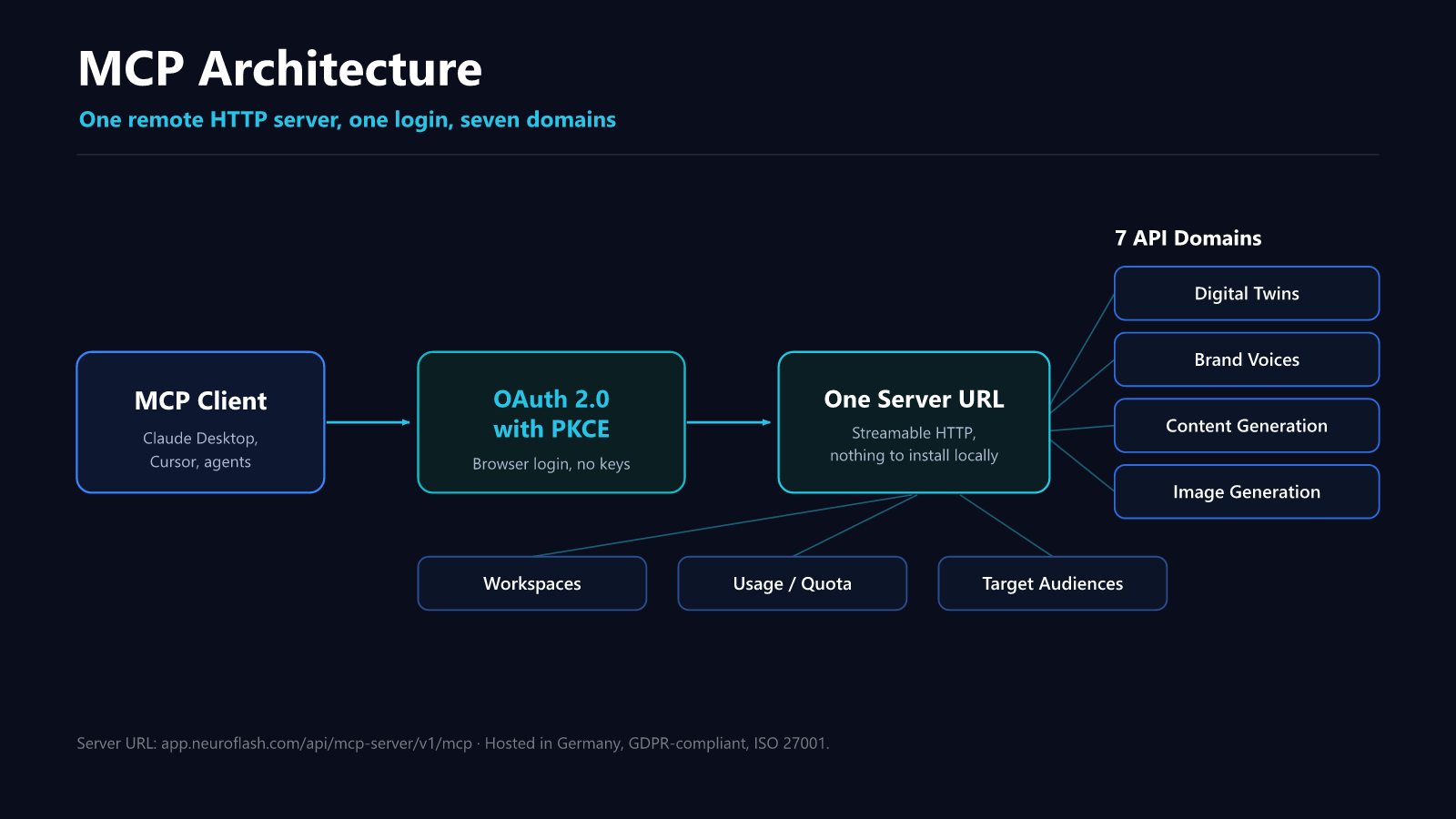
One login, one server URL, seven domains behind it. The server works with any MCP client that supports Streamable HTTP plus HTTPS or loopback redirects[2]. Worth noting for budgeting: API and MCP usage draw from the same workspace quota as the web app. There is no separate budget tier and no hidden meters, consumption is unified across every access path[2].
What do the three interaction modes do?
They give you three ways to talk to the same server, depending on the task. Traditional is one tool per endpoint for single operations. Plan bundles several steps into a typed JSON plan and saves roughly 80 percent of tokens. Exploratory navigates the API surface step by step for open-ended questions[2].
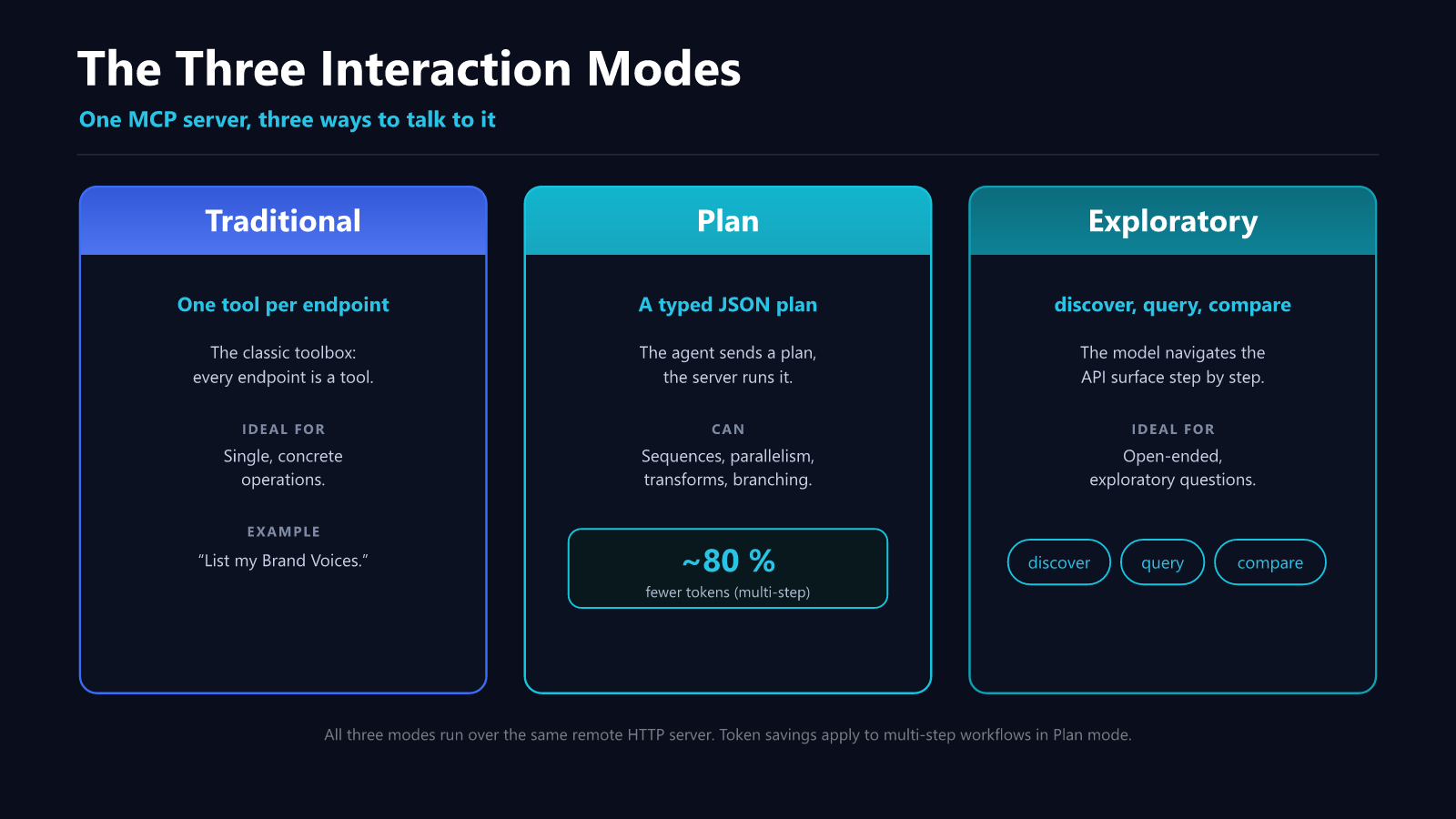
| Mode | Principle | Ideal for |
|---|---|---|
| Traditional | One tool per endpoint | Single, concrete operations (such as “list my Brand Voices”) |
| Plan | A typed JSON plan, executed server-side (sequences, parallelism, transforms, branching, bounded loops) | Multi-step workflows, roughly 80 percent fewer tokens |
| Exploratory | discover, query, compare | Open-ended, exploratory questions |
Plan mode is the most interesting one for production agents. Instead of letting the model fire off tool calls step by step, the agent sends a single typed plan that the server executes. A minimal example that queries a workspace’s quotas:
{
  "version": "1",
  "steps": [
    { "id": "all", "call": { "method": "GET",
      "path": "/api/usage-service/v1/workspaces/{workspace_id}/quotas" },
      "args": { "workspace_id": "$ctx.workspace_id" } }
  ],
  "return": { "all": "$all" }
}
The $ctx.workspace_id placeholder resolves automatically from the authenticated session[2]. On multi-step workflows this is exactly where the approach pays off, because intermediate results never have to travel through the model’s context window.
Which seven domains does the API cover?
The API is organized into seven functional domains, from audience simulation to usage accounting. Each domain bundles the endpoints of one task area, so you wire up only what your workflow actually needs[3].
- Digital Twins: query AI representations of real audience segments.
- Brand Voices: create, import and apply on-brand tone of voice.
- Content Generation: copy for every channel in your Brand Voice.
- Image Generation: on-brand visuals right inside the workflow.
- Target Audiences: manage your audiences.
- Usage/Quota: track consumption.
- Workspaces: support for multiple workspaces.
How do I set up the server in Claude Desktop and Cursor?
In Claude Desktop you add a custom connector; in Cursor you add the server to mcp.json. Either way, the single server URL is all you need, and the OAuth login in the browser handles the rest[2].
For Claude Desktop: go to Connectors under Settings, choose “Add custom connector” and drop in the server URL https://app.neuroflash.com/api/mcp-server/v1/mcp. A browser window opens where you sign in with your neuroflash account and authorize. Then set the tool permissions to “Allow All” so execution is not interrupted on every call[2].
For Cursor, add the server to ~/.cursor/mcp.json:
{
  "mcpServers": {
    "neuroflash": {
      "command": "npx",
      "args": ["mcp-remote", "https://app.neuroflash.com/api/mcp-server/v1/mcp"]
    }
  }
}
This works with any MCP client that supports Streamable HTTP and HTTPS or loopback redirects[2].
Get started
The fastest way into the create-and-validate loop: add the server URL to your MCP client, or connect the API directly, and fire off your first twin call within minutes. The resources below take you from the overview all the way to a finished integration.
- The neuroflash API at a glance
- The neuroflash MCP Server at a glance
- API documentation
- Set up the MCP Server
For the non-technical, marketing-side view of the same loop, see the sister article on Digital Twins via API and MCP in marketing.
FAQ
Do I have to install anything locally for the neuroflash MCP Server?
No. The server is a remote HTTP server over Streamable HTTP. You just add the server URL to your MCP client and sign in through the browser. There is no local server component and no API keys in config files[2].
How does authentication work?
Through OAuth 2.0 with PKCE. You authorize the client once via a browser login to your neuroflash account, after which the server works with scoped tokens. Any client that supports HTTPS or loopback redirects is compatible[2].
When is Plan mode worth it over Traditional?
As soon as a workflow spans more than one step. Plan mode bundles sequences, parallelism, transforms and branching into a typed JSON plan that the server executes, saving roughly 80 percent of tokens compared with individual tool calls. For single operations, Traditional stays the more direct route[2].
Do the API and MCP share the same quota?
Yes. API and MCP usage draw from the same workspace quota as the web app. There is no separate budget tier and no hidden meters, consumption is unified across every access path[2].
How reliable are the Digital Twins, really?
They are built on more than 1,000,000 real survey profiles with up to 255 data points per person, and they reach 85 to 95 percent prediction parity against real panels. Generic LLM prompts sit at around 55 percent. That is what makes the validation step in the loop reliable enough for pre-launch decisions[4].
Conclusion
The real leap forward is not that neuroflash now has an API and an MCP Server. It is that validation against a calibrated audience becomes a tool call your agent makes on its own. Plan mode with its token savings and the clean OAuth-2.0-with-PKCE setup show this was built for developers, not for marketing demos. If you run agents in production, hang the server in Cursor once and run the create-and-validate loop on a real piece of content. After that, the gap between “sounds good” and “lands with the audience” costs a tool call instead of a panel study.
References
[1] Vlahovic, Donald (2026): “Create content and test it directly against a real audience, straight from your agent.” neuroflash. https://neuroflash.synaps.media/api-mcp-launch-de/
[2] neuroflash (2026): “MCP Server: overview and documentation.” https://neuroflash.com/digital-twins-mcp and https://neuro-flash.github.io/mcp-server/index.html
[3] neuroflash (2026): “API overview and API documentation.” https://neuroflash.com/digital-twins-api and https://neuro-flash.github.io/api-docs/
[4] neuroflash (2026): “Digital Twins: methodology and data basis.” https://neuroflash.com/digital-twins-api