The last three months of neuroflash releases: new features, better models and fixes, each with a short look at what you can now do.
October 2026
8 OctThursday
AI Images
Describe your image…
WorkspaceImages
Use neuroflash on your phone, AI Images included
The app now opens straight away on phones and tablets, and AI Images works by tap.
No more desktop warningThe modal asking you to switch to a computer is gone, on every screen size.
Every image action by tapDownload, share, edit, twin feedback and upscale no longer hide behind a hover.
Made for small screensThe prompt box, menus and full-size view fit your phone.
Model
OGPT-6 Luna✓
AClaude Haiku 4.5
OGPT-6 Sol
Usage shows how quickly a model draws on your Capacity – for routine text, a lighter one is often enough.
High usage: draws on your Capacity faster – best for demanding tasks.
LowMediumHigh
AI models
See how quickly each model uses your Capacity
A small three-dot meter next to every model in the picker shows low, medium or high usage.
Choose with intentUse a lighter model for routine text and keep the heavy ones for demanding tasks.
Always currentThe meter follows the same values your usage is billed by.
Digital Twins
More audience templates in the Brand Hub
Creating an audience from a template now offers the same templates as the chat, grouped into generations, mindsets and buying behaviour, with new portraits and Spanish included.
Content
No more “Untitled” documents
A document you work on through the chat now takes the chat’s name, so you can find it again in My Content. Names you set yourself are never changed.
Content
Add, duplicate and convert blocks from the margin
A new plus button adds a block, and the handle menu duplicates, deletes or turns a block into a heading or quote. Ask AI on selected blocks works again.
September 2026
30 SepWednesday
AskReview and editKeep going
Digital TwinsContent
Create a brand voice or target audience without leaving the chat
Ask One Chat to build a brand voice or a target audience, and it opens a card right in the conversation.
Start from anythingA short description, your website or a document is enough.
Check before you saveReview and edit every field, including the language, before it’s created.
Keep goingOnce it’s saved, the chat continues with your new brand voice or audience.
Digital Twins
Ask your question first, choose who answers after
New to Digital Twins? Type your question straight away, then pick an audience template to answer it.
No setup firstSend your question without building an audience beforehand.
Pick who answersChoose from ready-made audience templates. We tell you how many twins will be created and roughly how long it takes.
Never retypeYour question waits while the twins are created, and your new audience stays selected afterwards.
AI models
Claude Sonnet 5.5 replaces Sonnet 5
Anthropic’s latest Sonnet is now in the model picker at the same credit cost. Conversations that used Sonnet 5 continue on 5.5 automatically.
Workspace
Everything you made, in one list
My Content now shows documents and your NeuroLens, NeuroRanker and NeuroSurvey projects together, with type filters and search.
Content
A refreshed writing editor
Continue writing works from its button again, older documents show all heading levels and nested lists correctly, and to-do lists export as checkboxes.
28 SepMonday
Model picker
OpenAIGoogleAnthropicMistral
AI Model
AI models
The latest AI models, in a picker that is easier to scan
Newer versions from OpenAI, Anthropic and Google, grouped by provider so you find your model at a glance.
Nothing to re-selectChats on a replaced model continue on its successor. GPT-5.6 Terra chats move to GPT-6 Luna.
GPT-6 Sol for depthSwitch to it for deep reasoning and long documents.
24 SepThursday
On Pro and pay-as-you-go
AI Model
Premium image models
AI models
Every premium model, now included in Pro and pay-as-you-go
Pick any model neuroflash offers, including our most powerful text and image models, and use it from the credits you already have.
Credits scale with powerA premium model draws a little more from the same pool. Use it when it matters, a lighter model for everyday tasks.
2 SepWednesday
Which headline makes performance marketers trust us more: A “Test before you spend” or B “Know what converts”?
Lena · 34 · Performance leadB. “Know” sounds like proof, not a promise.
Jonas · 41 · Agency strategistB, and I’d forward it to a client.
Mira · 29 · Growth marketerA feels safer, but B makes me click.
Great. Write a LinkedIn post around B.
Draft · LinkedIn postMost ad budgets are spent on a guess. We stopped guessing: before a campaign goes live, 10 Digital Twins tell us which message lands…
Your audience rates it 8.6/10
Ask your audienceCreateValidate
Digital TwinsContent
One Chat: ask your audience and create content in the same conversation
We merged our chats into one. Ask your Digital Twins what resonates, write the content, and check it with the same audience without switching tools.
Everything in one flowNo more copy-pasting between the audience chat and your content tools.
The right model, automaticallyDeep reasoning where it matters, fast answers where speed counts. No picker needed.
Results you can find againSummaries and reports get their own Actions section instead of disappearing into the chat.
Content
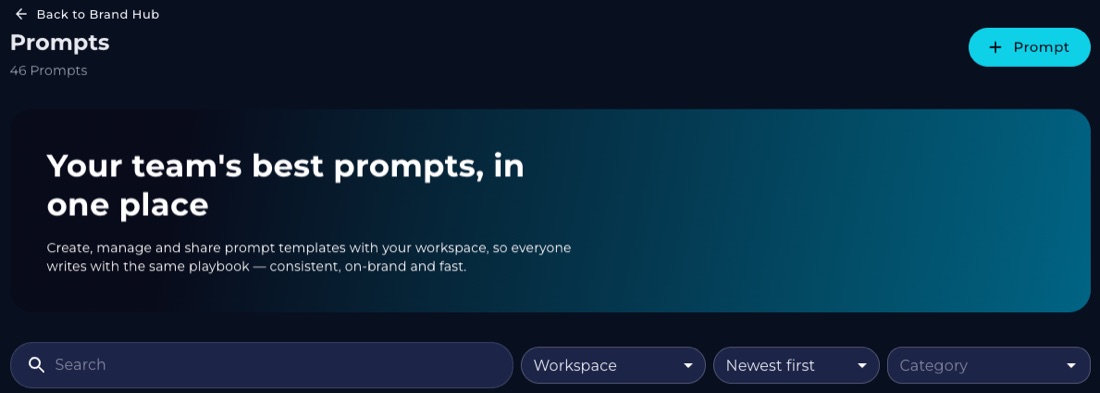
Your prompts, organised: the new Prompts page in the Brand Hub
Every prompt template in your workspace, in one searchable table.
Find prompts fastSearch by title and filter by category. Your own and shared prompts show by default.
Edit in placeAdd or change prompts right there. Changes appear in the chat’s prompt library straight away.
August 2026
6 AugThursday
Twins in your plan
Compare
Digital Twins
Your full twin panel now answers
Twin chat now brings every Digital Twin your plan includes to the panel, and keeps each twin’s memory to its own answers.
The whole panel, every questionIf your plan includes 10 twins, all 10 answer. The chat header shows how many are responding.
A consistent panelThe same audience gives you the same panel every session, so follow-ups stay comparable.
Each twin remembers only its own wordsAsk a twin to expand and you get its answer, not someone else’s.
Digital Twins
Create an audience, and your Digital Twins come with it
Building an audience in the Hub now creates its twins in the same flow. Describe your audience once by text, URL or file, confirm, and watch the twins appear on the audience page.
Images
A better default image model, plus a budget option
Nano Banana 2 Lite is the new default: faster, with clearer in-image text. Pick your model before you generate, including a clearly marked budget choice for exploring.
Community
Flash Hour: weekly office hours with the product team
Every Wednesday, 11:15 to 12:00 (Berlin). No agenda, no registration. Just bring your question.
Looking for older releases?
Earlier releases from 2026 are listed in our release archive.